Lesson 5 - Function
- Home
- / Fun With Excel
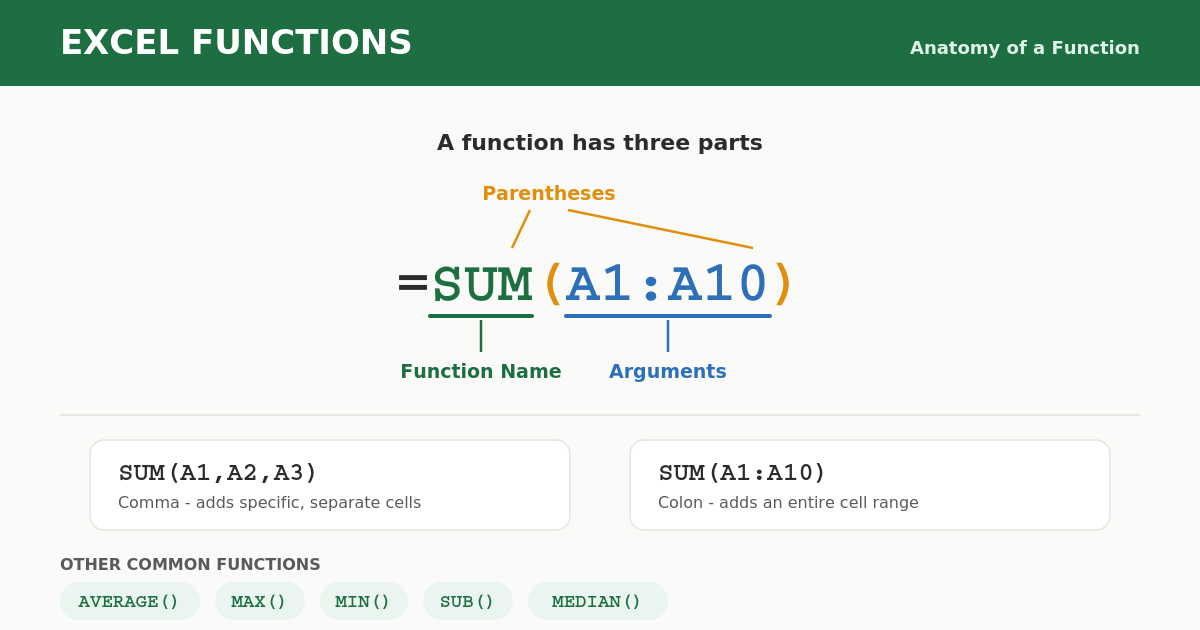
Function are actually a formula which are already defined in excel and you can used them directly, or you can say that they are predefined formula. One things you need to remember that there is no need to defining mathematical operation, you just need to enter the range of cell or cell address with function name having a “=” sign.
Now after knowing function, next we will learn how to use them. Inserting a function is very easy, because it’s a predefined so you just need to apply them as per requirement. Before inserting a function in a worksheet first learn about parts of function.
A name of function which you are going to define instead of mathematical operation, like SUM, SUB, AVERAGE etc.
Cell address or cell range which relation you need to calculate, like (A1, AA1, CCC3 etc.).
Parentheses is a bracket () to enclose the arguments separated with commas.
So on adding these three parts you will get a function like –
First function add the value of cell address A1, A2 and A3. Commas separate the cell address and helps to get a results. But when you need to add more than 3 or 4 cells then it’s a long method to type every cells address and separated it with comma.
Here “:” colon will help when you need to mention a cell range like in second function.
Similarly, you can applying more function in your worksheet like –
AVERAGE(), MAX(), MIN(), SUB(), MEDIAN() etc.

Vinay Bhatt is the Founder of LearnInCreation, an education and technology platform focused on making computer science and digital learning simple, practical, and accessible. He holds a B.Sc. degree from Kumaun University and has professional certifications in Full Stack Web Development, Digital Marketing, and Ethical Hacking. Passionate about education and technology, he creates beginner-friendly courses, practical learning resources, and projects that help students develop real-world skills and prepare for their careers.


LearnInCreation helps students learn computer science and technology through easy-to-understand courses, practical projects, books, e-books like learning resources, enabling them to build skills for academic success and future careers.
Watch old videos of computer lessons, Subscribe us on Youtube