Mon to sat Open: 10am - 6pm

Lesson 11 - Insert Date & Time

  • Home
  • / Microsoft Word - Advanced
ms-word-image

Inserting Date and Time


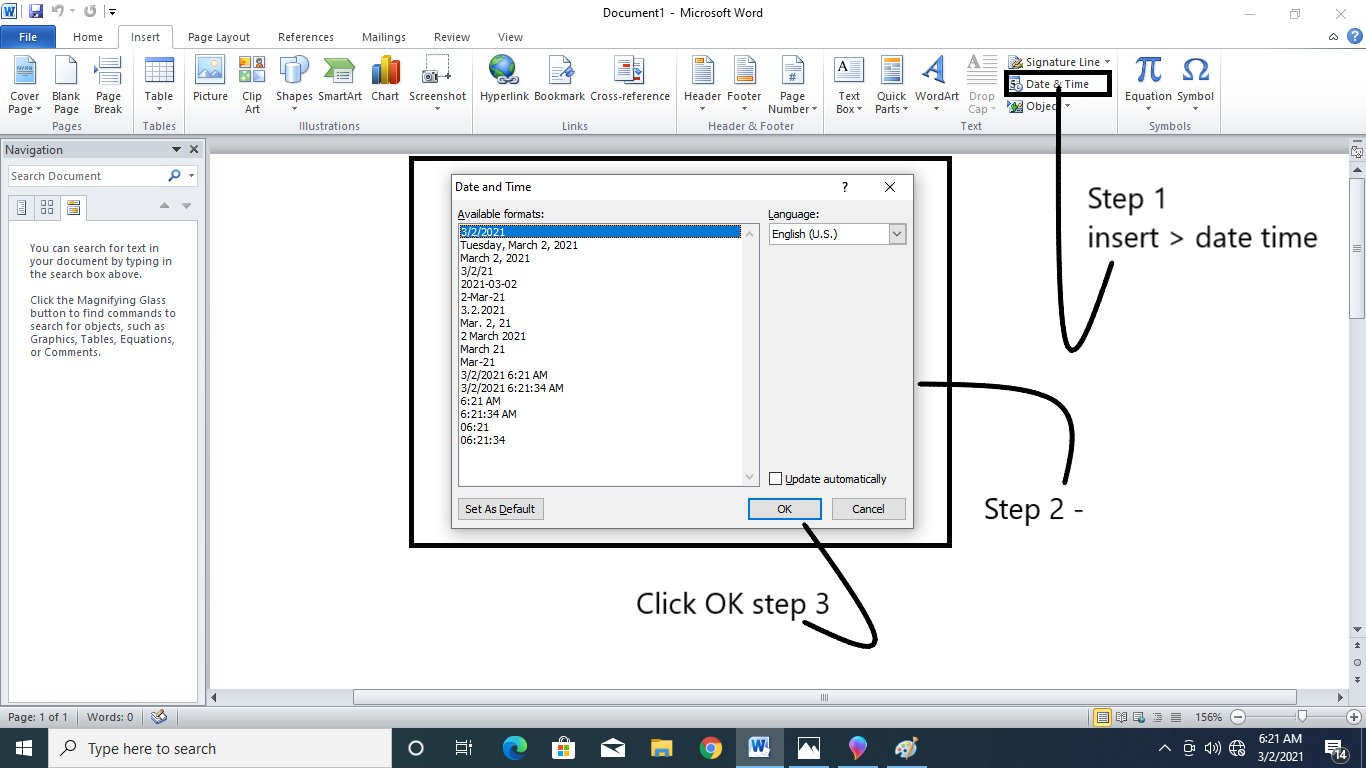
So, you want to insert the date or time in your document. This can be done with Date & Time command in Insert section.
Unlock your header or footer section and place the cursor to the point where you want to insert the Date & Time. Go to design tab and click on Date & Time command. Then follow these steps –


  1. 1. Date and time dialog box will appear.
  2. 2. Select the format of date and time.
  3. 3. If you want to update the time and date in your document, then check the box next to Update Automatically.
  4. 4. If you don’t want to update it then leave it as it is.
  5. 5. Click OK.

The date and time will appear in document.


About the author

vinay-bhatt-image

Vinay Bhatt

Vinay Bhatt is the Founder of LearnInCreation, an education and technology platform focused on making computer science and digital learning simple, practical, and accessible. He holds a B.Sc. degree from Kumaun University and has professional certifications in Full Stack Web Development, Digital Marketing, and Ethical Hacking. Passionate about education and technology, he creates beginner-friendly courses, practical learning resources, and projects that help students develop real-world skills and prepare for their careers.


Course Lesson -

Introduction, Working With Paragraph, Cut Copy and Paste, Paragraph Spacing, What is Line Spacing, First Line Indent, Header and Footer, Remove Header and Footer, The Designing Tab, Show and Hide, Insert Date and Time, Insert Page Number, Indent Marker, Tabs, Text Alignment, Drawing Shapes in Word, Find and Replace, Font Size and Style, Subscript and Superscript, Strike Through, Use Spell Checker, Textbox and WordArt, Hyperlink in Word Document, Add Email in Document, Indent and Tab, Smart Art,

Join Learnincreation Study Center

Join LearnInCreation Study Center to learn practical computer and technology skills through simple lessons and hands-on training. Choose from Computer Basics, MS Office, Programming, Web Designing, Digital Marketing, and more. Get guidance, practice your skills, and prepare for your future. Visit our study center and enroll today!